
Dubbing a Video with Multiple Speakers
A talking head is easy. An interview is where dubbing actually fails — two people start sounding like one, a name lands in the wrong mouth, and the viewer stops following the conversation without being able to say why.
Multi-speaker dubs break for one reason more than any other: the speaker labels are wrong before anything is generated. Spend two minutes listening through the transcript and correcting who says what, give each speaker one voice setting for the whole project, then review a few lines per speaker instead of a few lines per minute. Everything else — interruptions, short replies, long videos — is a variation on that discipline.
Single-voice video is forgiving. Get the pronunciation wrong and a viewer shrugs. Get the speaker wrong and the whole thing stops making sense: dialogue depends on knowing who is talking. So the dubbing craft for interviews, panels, podcasts and scenes is mostly bookkeeping — done once, early, cheaply.
1. Read the transcript like a producer, not a proofreader
After transcription, most tools show you the words. Look at the labels instead. Every line carries a speaker tag, and the question for each one is simple: is this the person who actually says it?
Two minutes of this saves an hour later, because the labels decide which voice each line is generated with. A mislabelled line is not a typo — it is the host answering in the guest's voice.
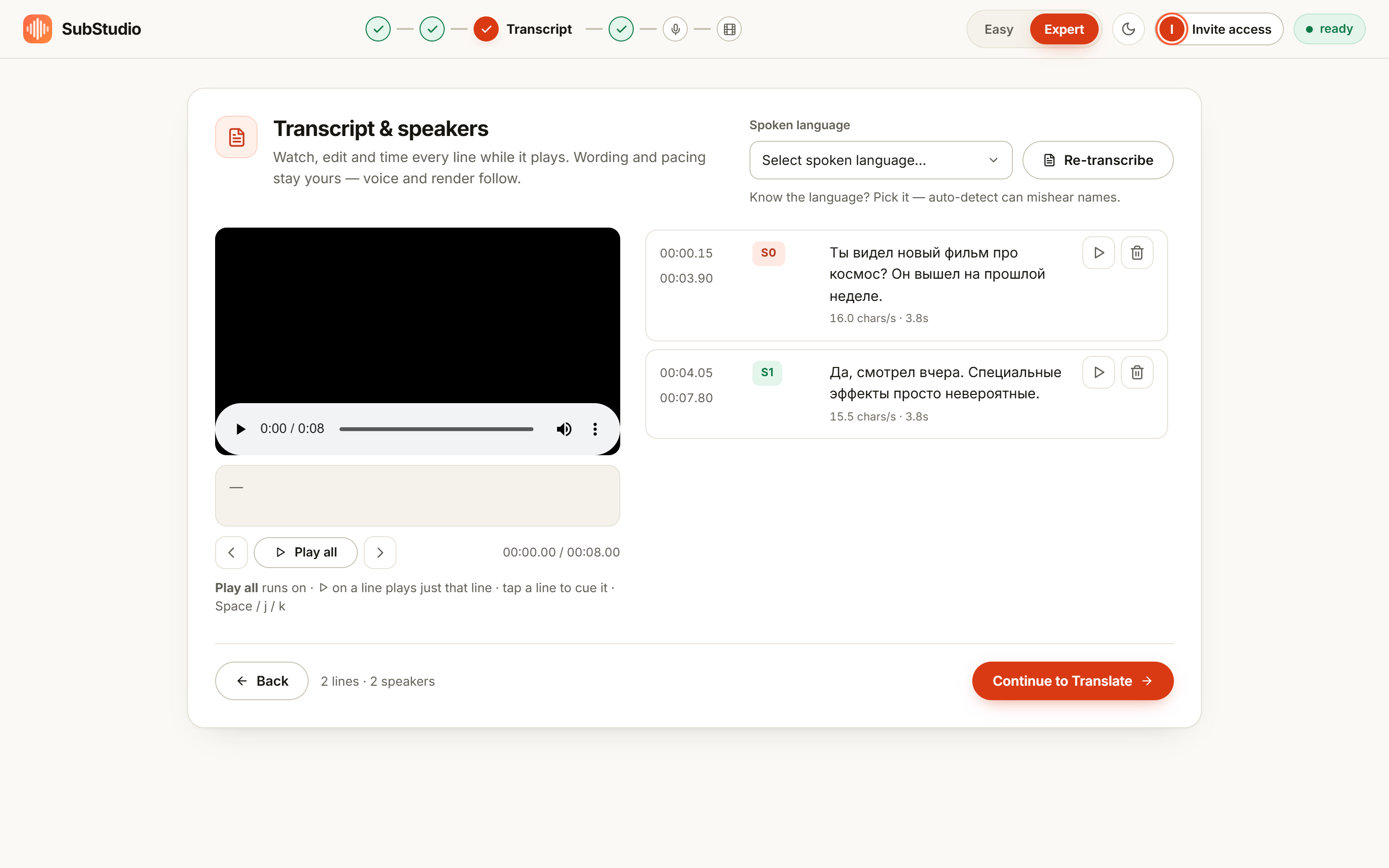
What to listen for specifically:
- Short replies. "Right.", "Exactly.", "No way." — one-word turns are where labels flip, and a flipped one is instantly audible.
- Turn boundaries. Where one person stops and the other starts. If a line contains half of each speaker's sentence, split it.
- The first and last line. Tools are worst at the edges of a recording, where there is no context to learn from.
2. Give each speaker one voice, set once
The mistake that ruins long videos is tuning a voice line by line. Voices should be a property of the speaker, not the sentence: set it once and every line they say inherits it. That is what keeps a host sounding like the same person at minute four and minute fifty-four.
Most tools offer a small set of choices per speaker, and the decision is easier than it looks:
| Speaker | Choose | Why |
|---|---|---|
| You, or anyone who agreed | Their own voice | The audience already associates the face with the voice — keeping it is most of the immersion |
| A guest, stranger, or anyone who never signed anything | A designed voice | An original synthetic voice, configured once, with nobody's likeness to clear |
| Narrator or host in a formal video | A steady delivery | Consistent read; nothing wanders between lines |
| Acted, comic or emotional dialogue | An expressive delivery | The performance has to move with the line, or the scene goes flat |
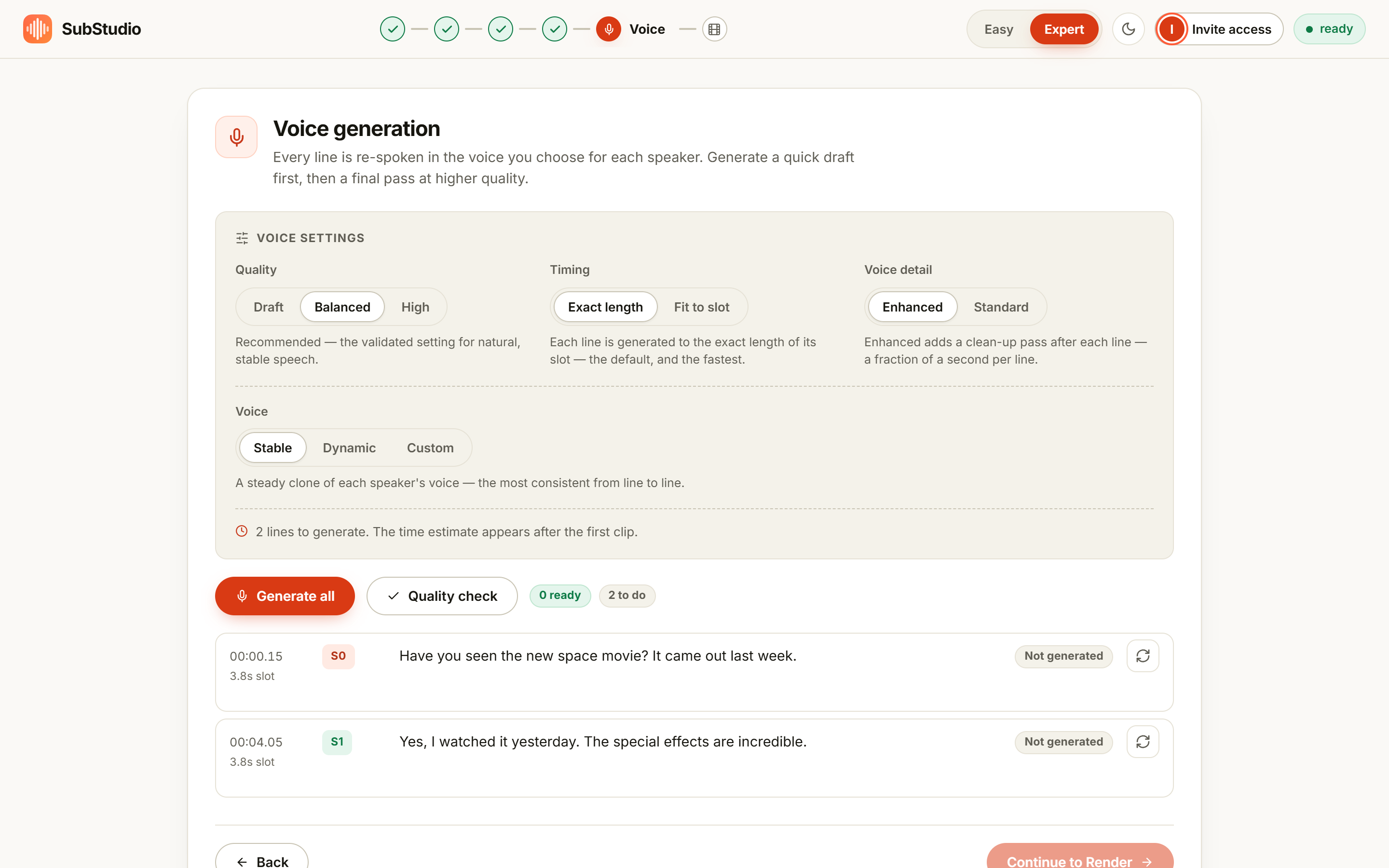
Mixing is allowed and often correct. A host keeps their own voice; the guest who never signed a release gets a designed one. That is not a compromise — it is the professional answer, and it is a per-speaker switch rather than an all-or-nothing project setting.
3. Handle interruptions on purpose
Real conversation overlaps. Dubbing does not have a great answer for two people speaking in the same half-second, so make the decision explicitly instead of letting the tool guess:
- Split the exchange into one line per turn, so each speaker gets their own slot on the timeline.
- Let tiny interjections ride along. A murmur under someone else's sentence is better folded into the neighbouring line than generated as its own clip, where it would land late and sound strange.
- Rewrite what cannot fit. If two people genuinely talk over each other for several seconds, a slightly condensed translation that fits the slot beats a faithful one that races.
4. Review by speaker, not by minute
Once the voices exist, listen in the wrong order and you will miss the wrong-order problems. A useful pass:
- Pick three lines per speaker — one early, one middle, one late. Play them back to back. If they are not the same person, stop and fix the voice before generating the rest.
- Then play the exchanges. Two speakers in a row is where a swapped label shows up, because the contrast is what makes it obvious.
- Then the first second of each line. The opening moment is where a clipped start or a stray word in the wrong language lives.
Doing this in a tool where every line is its own clip is the difference between a two-minute fix and a redo. Regenerate the line; leave the other forty alone.
What goes wrong, and what it usually is
| What you hear | Likely cause | Fix |
|---|---|---|
| Two speakers sound identical | One speaker label covering both people | Split the labels, then regenerate the affected lines |
| A line lands in the wrong person's voice | A mislabelled short reply | Move the line to the right speaker and re-make that one line |
| One speaker sounds thin or unstable throughout | Poor source audio for that person — a distant mic, a quiet voice | Fix the source if you can; otherwise give that speaker a designed voice |
| A guest sounds "off" but you can't say why | Energy mismatch: flat delivery on an animated line | Switch that speaker to a more expressive delivery |
| Replies arrive a beat late | Very short lines squeezed into a tight exchange | Lengthen the slot by trimming the line before it, or fold the reply in |
When multi-speaker video is not worth dubbing
Be honest about this too. Four speakers in a room where everyone talks over everyone else, with names you cannot verify, in a language nobody on your team can check — that is a subtitling job, not a dubbing job. The dub will cost you an afternoon of label surgery and will still be worse than the captions. The format that rewards dubbing is one voice at a time: interviews with clean turns, host-plus-guest, narration, tutorials, dialogue that mostly behaves itself.
The bottom line
Multi-speaker dubbing is a transcript problem before it is a voice problem. Get the labels right, set one voice per speaker, review a few lines per person rather than a few per minute, and let the tool regenerate single lines instead of whole videos. Do that and an interview in another language stops feeling translated — it just feels like an interview.
Dub an interview and keep every voice
Speaker labels are editable, voices are set per speaker, and each line can be re-made on its own. The free plan covers short clips end to end.
Open the studioFrequently asked questions
Why do dubbed interviews sound like one person?
Usually because the speaker labels were never checked. If the transcript thinks one person says everything, everything is generated with one voice. Correcting the labels before generating costs minutes and prevents the whole problem.
Can one speaker keep their real voice while another gets a synthetic one?
Yes, and it is a common setup for interviews: the host keeps their own voice, a guest who never signed anything gets a designed voice. Set it per speaker and only their lines regenerate.
What about speakers who interrupt each other?
Overlapping speech is the hardest case for any tool. Split the exchange into clean turns so each has its own slot, and let very short interjections fold into the neighbouring line rather than becoming their own clip.
How do I keep a voice consistent through a long video?
Set the voice once per speaker, then review lines from the start, middle and end rather than only the beginning. Drift is caught by listening; settings alone will not tell you.